Everyday makeup - Albatross
- os3677
- Apr 29
- 7 min read
Updated: Apr 30
Make-Up
On this particular day I had to go out to my university to return the borrowed Insta360 back to Media Services, and when I got back home I got to recording my next video! I thought of showcasing my normal everyday make-up as a little switch up to the original concept, because if I am going to showcase me getting out of my comfort zone I feel we need to compare to me inside my comfort zone. I did not take any proper photos or recorded a timelapse for this one, as I was not planning on recording a video in the first place, but I took some TikToks of myself (because I liked how I look, duh).


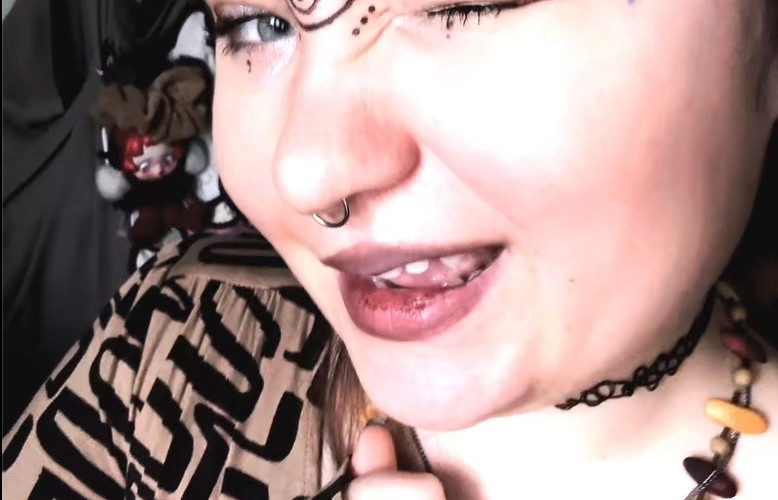
I did not use any special technique for this look, because it is just your usual primer, eyeliner, bronzer, mascara and powder everyday look, but I will say that I never, NEVER leave my house without that little spiral between my eyes. It is just something about it that completes me. That is my favourite part of all my looks, because I feel it adds a little whimsy to someone else's day, and I know that because I get stopped quite often for people to ask "Is that a tattoo?", "How did you do that?", and the usual "I like your... little thing on your forehead" talk. My least favourite part however were my bangs, and how I had to clip them back, because it was wash day. I do not like showcasing my entire forehead out to public, because if you look for too long you might turn into stone (just kidding). However, this way I got out of my comfort zone and showed the internet my bare forehead with my bangs clipped out of the way, so extra points for myself.
Video Topic
For the topic of this video I did some quick research on a bird we do not get in the United Kingdom - the albatross! They are one of the most intriguing birds I have learned about, and I wanted to showcase that for the video. I used Wikipedia to make notes on what to say, as I trust that Wikipedia would not have any AI generated crap. Since I still want to make short form content, I did not want to overload myself and the viewers with notes, so I just covered the basics, like the albatross' mating behaviour, their maturity, and wingspan. There is not much else I can tell you here, as everything else is in the video which is at the end of this blog. Make sure to follow as well ;)
Recording
Because I did not plan to record this day, and had already returned the camera (but still had the microphones) I decided to try out recording in a different format... I am blessed with having a MacBook, which comes pre-installed with Photobooth! Photobooth is essentially the MacOS camera app and it comes with a bunch of cool filters, so I thought it would look cute if I used the hearts filter on myself. Staying at home and recording in my bedroom was definitely WITHIN my comfort zone, but it felt much more easier to be myself on camera and it felt a bit more authentic. This also meant I did not have any outside environmental factors keeping me from recording this video, and it was a perfect environment meaning nothing could go wrong.

However, because this is still a laptop camera it was not great quality and totally not industry standard, but I still think I did great with what I had. I think the camera quality would have been better if I used lighting to make myself brighter, appearing sharper on Photobooth, or if I had just used a proper camera that would have been better.
Editing
I took a different approach to editing this video in particular. Since I had problems with the background audio directly in TikTok, I decided to add a song in After Effects (AE) and play around with it a bit. From my years and years of watching YouTube videos and consuming endless TikToks I have noticed a technique people use with audios, and that is to cut the audio out at significant moments, for example if something funny is said or if it is an intense conversation. In the editing suite of TikTok that is not an option for some reason, so that is why I decided to do it directly in AE, giving me endless possibilities to play around. I edited my clips as usual, and adapted the audio to match the feelings in the video, like when I was empathasising how big the wingspan of an albatross is and at the beginning of the video when I did dramatic eye fluttering. The audio I actually got recommended on TikTok itself, and it is called "Lazy" by PonPieHi, but I could not directly download the .mp3 file from TikTok, and luckily I was able to find it on YouTube and used a YouTube to mp3 online converter. I specifically wanted a song which would go over the runtime of my video, and this song was 2 minutes and 35 seconds long, but with all the cut outs I did it fit the video just right. I think if I had run out of this song and needed more audio, I would have just looped it to make up for the loss, which I know people doing social media already do.
Fitting in the audio and making comedic pauses took a little while, but it still felt a bit empty... So I took another approach to fill in the void. I added sound effects to appropriate moments, as this is an editing technique a lot of my favourte Youtubers use, for example Naomi Jon who I think would be my greatest inspiration for my editing style here, but unlike me she is a singer and makes up her own sound effects half of the time (which I would love to do in future videos). For the sound effects I downloaded a sound pack from Adobe as I have used these previously in A-Level Media and knew these were copyright-free, however the only one I ended up using was an audience clapping when talking about the albatross' dedication to finding a partner. Aside from that, I used an already popular sound from a fellow favourite YouTuber I have mentioned before, Noel Miller, alongside a now problematic Cody Ko, where they collaborated on a reaction video and gave birth to one of my favourite vocal stims. This audio contains them being grossed out by something, shouting out loud "Eww dude, what the f**k!", but I only used the "Eww" part of it when at the end of the video I was talking out loud to myself about lizards and their shed. You'll see it when you watch my video, it's great.
Aside from audio, I also taught myself a handy trick in AE, which I am surprised none of my lecturers ever thought to teach us... Motion Tracking! During my talk about the albatross, I put my hand out to show off the wingspan of the bird as kind of instinct, because right there and then I knew I wanted to challenge myself. Motion Tracking is not actually as difficult as I thought, as After Effects makes it much more easier for the user to use, atleast on a basic level. I used a YouTube tutorial which I followed every second of it and got the result I needed!

In Lee terms, the workspace window Tracker has to be enabled to start the "Track Motion" action, giving you a Tracking Point, which is like a mouse cursor. The Tracking Point is what your image will be following, and I stuck the Tracking Point to my palm and attached the image to it. The YouTube tutorial obviously goes into depth, but now that I have used Motion Tracking once it is really easy to use for future videos and projects.
Oh! Another thing I added was the Wikipedia mascot GIF that my partner imported from the website itself for their anniversary event! My partner edited the gif to add caption to it, and they begged me to include in the video, so I did. I did not do anything special with it, that is why I almost forgot to write about it.
In the end, I do like how this video came out compared to the others, although it is more of a YouTuber style video than a TikToker, but I am really, really happy with it! I will definitely be attaching myself to this video editing style for my future projects, and fulfilling the dreams of 10-year old me when I was just using VideoStar and fan-made presets to make edits of my toys. If I could go back in time and changing anything, it would be to export the video in vertical form, but somehow I do like the horizontal videos on a vertical device feeling.
Uploading to TikTok

For the caption of this video I basically did the same as with the others; written about anything relevant to the video and asked for feedback, since I had switched up my editing style for this one. The hashtags I used for this were #funfacts, #albatross, #birdfacts, #funnycontent, and of course my own hashtag, #creatureonstreet. Before officially uploading this I had saved the original TikTok audio for the same song I used in AE, as if I attach the already made audio my video will be more likely to be seen by people who recently interacted with that audio, and to avoid echo I muted the sound of the original sound and just kept my video's original audio. I also added a text caption on top of myself in the beginning of the video, writing "fun facts with dudlee!" to let viewers know what treat they are in for this time. At last, I uploaded it and waited for response!


Comments